
Appearance
Cross-CPT Relationships
When your WordPress site uses relational fields — fields that link one post type to another — generating realistic content requires more than just creating posts in isolation. A property post type with an ACF relationship field pointing to agent needs actual agent posts to reference. If you generate 20 properties but no agents exist, every relationship field comes out empty. WPfaker's Dependency Resolver automatically analyzes these cross-CPT dependencies and ensures that the required related posts exist before generation begins.
This system works transparently. When you generate posts for a post type that has relational fields pointing to other CPTs, WPfaker scans those fields, checks whether enough target posts exist, and auto-creates any that are missing. The result is fully linked content that exercises your dynamic templates, archive pages, and query builders under realistic conditions.
TIP
Cross-CPT dependency resolution is separate from the 3-pass generation system described on the Custom Fields page. The Dependency Resolver runs before generation to ensure target posts exist. The 3-pass system runs during generation to populate relational fields in the correct order.
How It Works
The Dependency Resolver operates in three steps: analyze, check, and create.
Step 1: Analyze Dependencies
When you request post generation for a CPT, WPfaker scans all relational fields assigned to that post type. It checks both field plugin fields (ACF, JetEngine, Meta Box AIO) and JetEngine Relations to build a complete map of which post types your CPT depends on.
For each relational field, the resolver records:
- The target post types the field references
- The cardinality (one-to-one, many-to-one, one-to-many, many-to-many)
- Whether the field is required
- The source (field plugin or JetEngine relation)
Self-references are filtered out. If a property post type has a relationship field that references other property posts, the resolver ignores it because those posts will be created in the same batch.
Step 2: Check Existing Posts
For each target CPT, the resolver counts how many posts already exist. If your site already has 10 agent posts and the resolver determines that 5 are needed, no new agents are created.
Step 3: Auto-Create Missing Posts
When the existing count falls short, the resolver creates the missing posts automatically. Auto-created posts are fully populated — not just stubs with a title. If a default template exists for the target CPT, the resolver uses it, ensuring the auto-created posts match your configured field settings, taxonomy assignments, and content preferences. Without a template, WPfaker's automatic field configuration fills all detected custom fields.
INFO
Auto-created posts are always set to publish status by default, so they are immediately available for relational field population. You can override this through per-CPT options in the generation UI.
Supported Field Types
The Dependency Resolver recognizes the following relational field types across all supported field plugins:
| Field Type | Plugin | Multiple |
|---|---|---|
post_object | ACF | No |
post_object_multi | ACF | Yes |
relationship | ACF | Yes |
page_link | ACF | No |
posts | JetEngine | Yes |
post | Meta Box AIO | Configurable |
| JetEngine Relations | JetEngine | By cardinality |
For JetEngine Relations, the resolver also scans the dedicated Relations system (stored in jet_rel_* tables) and includes any post-to-post relations configured for the source CPT.
Cardinality Defaults
The Dependency Resolver uses a uniform default of 5 target posts for all cardinality types when no per-CPT configuration is provided. You can override this default through the per-CPT options described below.
Per-CPT Configuration
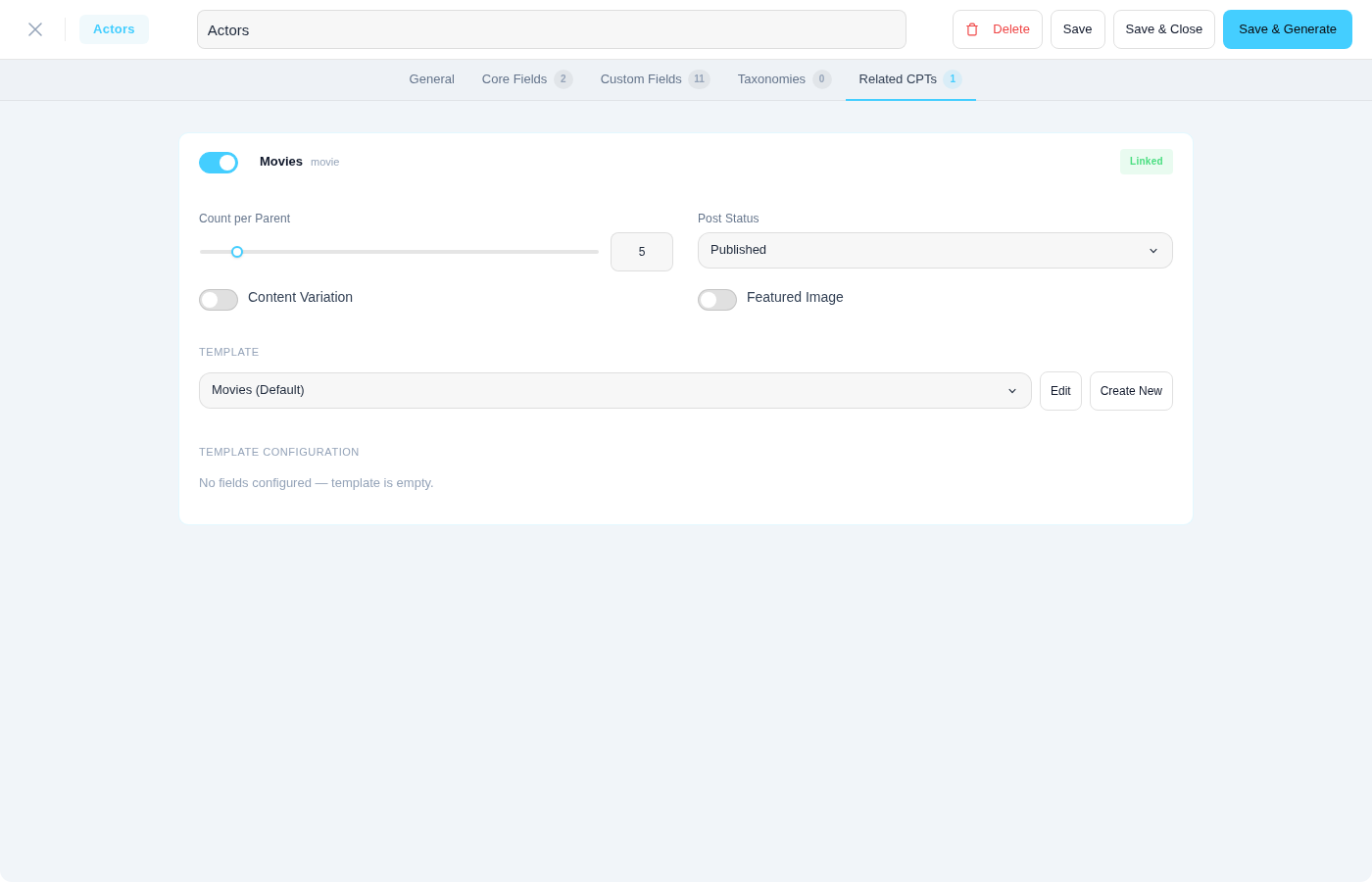
The generation UI allows you to configure options for each dependent CPT individually through the related_cpt_options setting. For each target CPT you can control:
- count — Override the default number of posts to ensure (e.g., create exactly 10 agents)
- enabled — Disable auto-creation for a specific CPT (use only existing posts)
- post_status — Set the status for auto-created posts (default:
publish) - set_featured_image — Whether auto-created posts receive a featured image (defaults to on)
- enable_variation — Apply Content Variation to auto-created posts
When a default template exists for the target CPT, the resolver uses it as the base configuration. Per-CPT options override the template where both are set. These options are also available in the Template System, where they are saved as part of the template configuration for one-click reuse.
Related Posts and Chunked Generation
Auto-created related posts are generated separately from the main posts. The Dependency Resolver runs before the main generation begins and creates any missing target posts in their own chunks. This means related post counts are not limited by the main post count — each set of posts is generated independently within the chunked generation system.
For example, generating 60 properties that depend on agents and locations triggers the resolver to create the required agents and locations first (each in their own chunked requests), then generates the 60 properties in chunks afterwards.
Circular Dependencies
Circular dependencies occur when two or more post types reference each other. For example, property has a relationship field pointing to agent, and agent has a relationship field pointing to property. Generating properties would trigger agent creation, which would trigger property creation, and so on indefinitely.
WPfaker handles this with two safeguards:
Recursion stack: The resolver maintains a stack of post types currently being resolved. If it encounters a post type that is already on the stack, it breaks the cycle by returning the existing posts of that type instead of creating new ones.
Maximum depth: The resolver enforces a maximum recursion depth of 3 levels. Even without a direct circular reference, deeply chained dependencies (A → B → C → D) are capped to prevent excessive auto-creation.
property → agent → agency → property (circular!)
                                ↑ resolver stops here, uses existing properties
WARNING
When a circular dependency is detected, the resolver uses whatever posts of that type already exist in the database. If none exist, the relational fields in the cycle will have no targets. To avoid this, generate the least-dependent CPT first, then generate the one that depends on it.
Recursive Auto-Creation Prevention
Auto-created posts have the auto_create_related flag set to false. This prevents a cascade where auto-creating agents for a property batch would itself trigger auto-creation of properties for those agents. Only the top-level generation request triggers dependency resolution. Auto-created posts receive their non-relational fields immediately, and their relational fields are populated in the second pass from the posts available at that point.
Because auto-created posts skip dependency resolution, their cross-CPT relational fields cannot draw from a pre-built pool. Instead, WPfaker uses a database fallback: it queries for existing published posts of the target type and links to those. This means auto-created agents will reference whatever property posts already exist in the database, rather than incorrectly linking to other agents or leaving the field empty.
Integration with the 3-Pass System
The Dependency Resolver and the 3-pass generation system work together but at different stages:
- Before generation: The Dependency Resolver runs, ensuring target CPTs have enough posts.
- Pass 1: All posts in the current batch are created with non-relational fields populated. Relational fields are skipped.
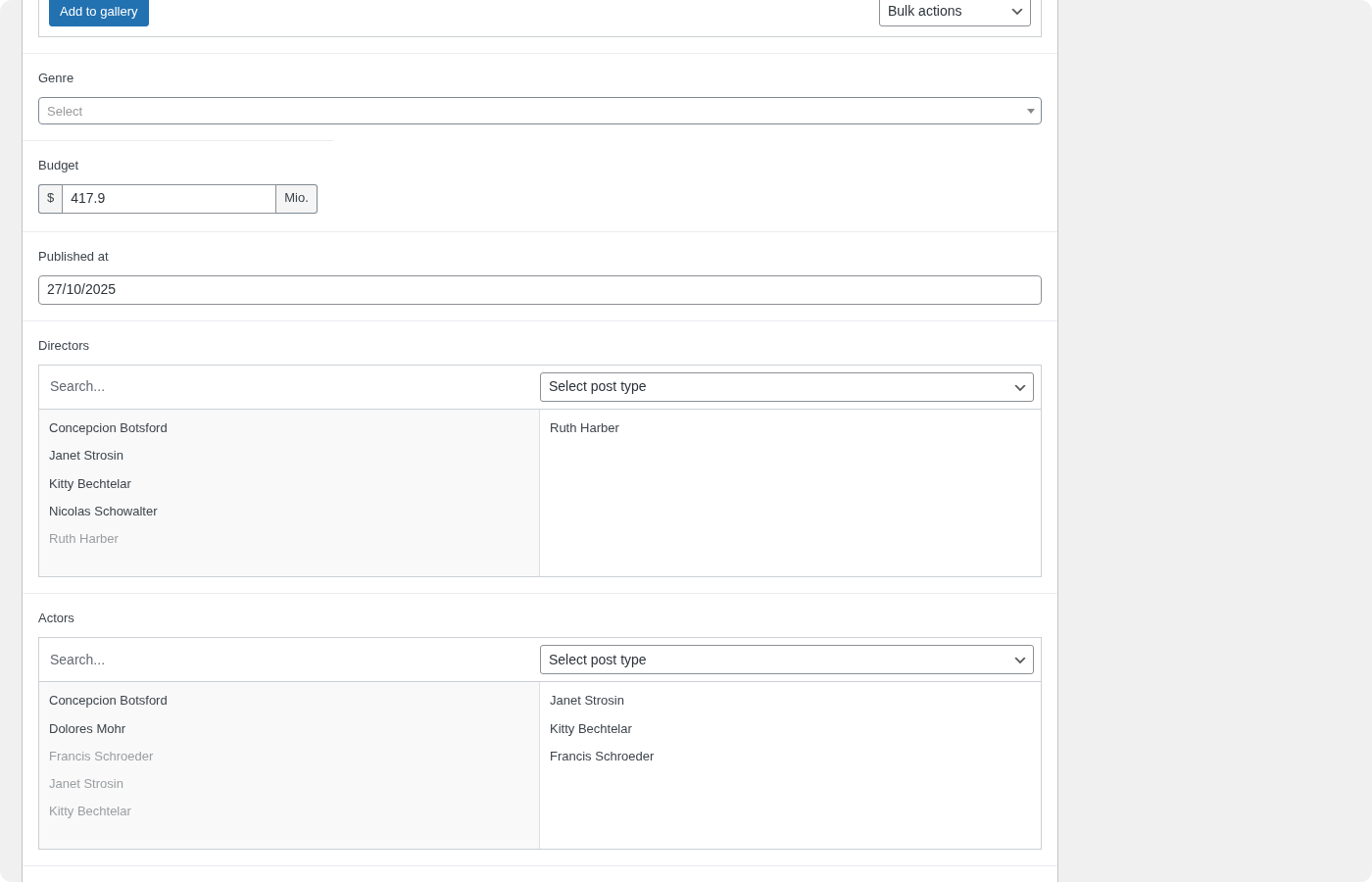
- Pass 2: Relational fields are populated by selecting from the combined pool of existing posts (including those auto-created by the resolver) and newly generated batch posts.
- Pass 3: JetEngine Relations are written to the dedicated relation tables.
This separation ensures that the relational field population in Pass 2 has the maximum pool of target posts to choose from.
REST API
You can query a post type's dependencies programmatically through the Dependencies endpoint. This returns the full dependency analysis including target post types, cardinality, existing post counts, and whether a default template is available for each target.
Troubleshooting
If relational fields are empty after generation, check whether the target post type has any published posts. The resolver only auto-creates posts when the generation request includes relational field support. Verify that the relational field's configuration specifies a concrete target post type — fields configured to reference "all" post types are skipped by the resolver because the target is ambiguous.
If too many or too few posts are auto-created, check the per-CPT configuration in the generation UI. The default counts are based on cardinality, but you can override them to match your testing needs.
For circular dependency issues, generate the post types in order from least to most dependent. Create the "leaf" CPTs first (those with no outgoing relational fields), then generate the CPTs that reference them.
INFO
For general information about relational fields and the 3-pass system, see the Custom Fields page. For JetEngine-specific relation handling, see the JetEngine Fields page.